Rustic Playground v0.4 — Bring Your Own Toolchain
Every Rust developer eventually ends up juggling toolchains. You want stable for your real work, nightly to try a feature that hasn’t landed yet, and maybe a pinned older version because you’re checking whether something still builds on your MSRV. On the command line, rustup makes this easy. Inside a GUI playground, it usually means editing a config file by hand and hoping the app notices.
Rustic Playground v0.4 fixes that. The headline feature is a multi-version toolchain picker that lives right in the toolbar — install, switch, and pin Rust toolchains without ever opening a terminal.
Click the pill, pick a toolchain
The toolchain status pill has always told you whether your Rust setup is healthy. Now it’s also a picker. Click it and you’ll see every toolchain rustup has installed:
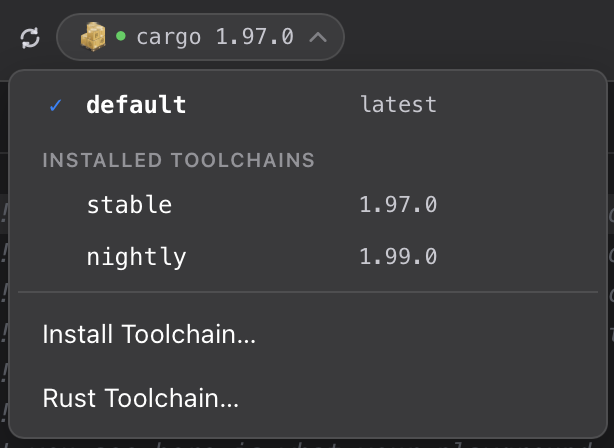
- A ✓ marks the toolchain currently in use.
- A 📌 marks the one this project pins.
- A
default · latestrow at the top uses whateverrustupdefaults to.
Selecting a toolchain writes it to the project’s rust-toolchain.toml — the exact same file and format rustup itself reads. That’s the important part: the pin isn’t some app-private setting. Open the same project folder in your editor or run cargo build from Terminal and you’ll get the same toolchain. Rustic Playground is just giving you a friendlier way to manage a standard file.
Each project remembers its own pin. Pin one project to nightly for some experimental syntax, and your other projects keep humming along on stable. Switch between them and the pill updates to show which toolchain is really in play.
Install toolchains in-app
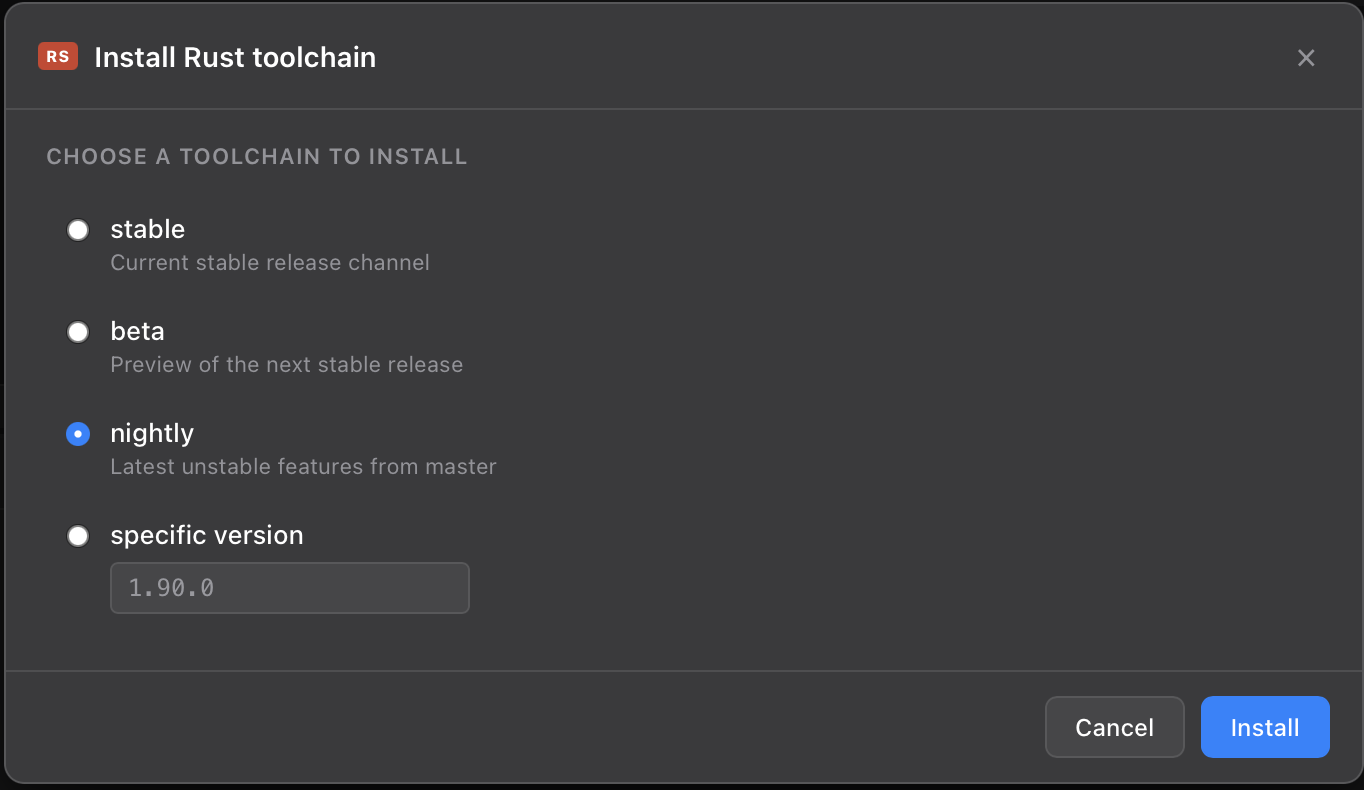
Don’t have the toolchain you want? Click Install Toolchain… at the bottom of the picker. Choose stable, beta, nightly, or type a specific version like 1.85.0, and the app runs rustup toolchain install for you — streaming the download and progress live in a dialog, the same way running a playground streams its output. When it’s done, the new toolchain shows up in the picker, ready to select.
There’s also a small nudge built in: if a newer stable release exists than anything you have installed, the picker surfaces an “Install newer stable?” hint. It’s smart about channels, too — if you’re already running nightly 1.99, it won’t badger you to install stable. You clearly know what you’re doing.
No surprises: explicit over silent
Here’s a design decision I want to call out, because it’s the kind of thing that’s invisible when it’s right and infuriating when it’s wrong.
When a project pins a toolchain you don’t have installed, rustup will, by default, quietly download it the moment you build. That’s convenient — right up until you press Run expecting instant feedback and instead wait three minutes for a 200 MB nightly to download that you forgot was pinned.
v0.4 doesn’t do that. If a pinned toolchain is missing:
- The pill turns yellow and tells you exactly which toolchain is missing — showing the name you asked for, not the fallback that quietly stepped in.
- Pressing ⌘R stops and points you at the one-click install, instead of kicking off a surprise download.
- Nothing is installed until you say so.
Install should be a decision you make, not a side effect you discover. If you ever change toolchains from the terminal while the app is open, there’s a refresh button next to the pill to bring the app’s view back in sync — and it re-checks automatically when you switch back to the window.
More on the reasoning behind this — why “explicit over silent” was the right call for a learning app — in a separate post: When the tool should refuse to help.
A few new templates
New playgrounds ship with v0.4 to show off what the picker makes easy to explore:
- System Info — prints your
rustcandcargoversions, the compile target, and the environment your code runs in. Handy for confirming which toolchain actually built a given playground. - Let-chains (Rust 1.88+), Let-else, and a Modern std tour covering recent additions like
is_some_and,inspect, and arraywindows.
Point a template at nightly, run it, then switch to stable and watch it fail to compile — the fastest way to build intuition for what landed when.
Getting v0.4
Download it from rusticplayground.dev. It’s signed and notarized, so it opens cleanly on macOS 12 and later (Apple Silicon). If your Rust toolchain needs installing or updating, the app will walk you through it on first launch.
As always, Rustic Playground is a developer tool that runs code with your local toolchains — powerful, and intentionally not sandboxed. Run code you trust.
If you find it useful, a ⭐ on GitHub genuinely helps, and you can sign up for release updates right from the About window.
Happy hacking. 🦀
Subscribe
Occasional notes on building things — mostly software, sometimes with AI. No spam.
No spam. Unsubscribe anytime. Powered by Buttondown.